


Everything you need to know about our most powerful supplier tool.
At the start of 2025, we introduced Sales Assistant to Poptop suppliers. A world-first for the events industry, Sales Assistant is a high-precision automated admin assistant – built to cut out the admin noise and help suppliers convert more bookings than ever before.
Earlier this year, we announced some huge upgrades to Sales Assistant, meaning it’s now even more powerful than it was when first launched – a genuine game-changer for the way event suppliers process quotes, communicate with prospective clients, and generate revenue.
In this blog, we’ll give you a full run down of what Sales Assistant is designed to do, and how to use it to your full advantage. But before we dig in, here’s a quick piece of good news. Whilst Sales Assistant is incredibly complex under the bonnet, it’s insanely easy to use!
Let’s get into it.
How Sales Assistant Works
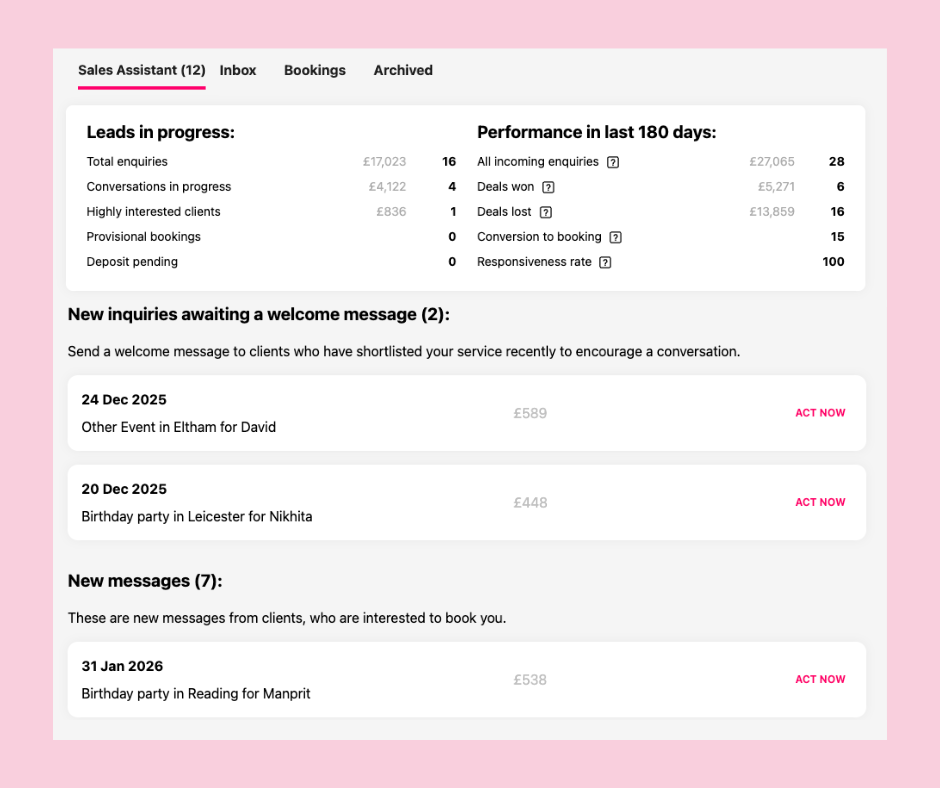
To better understand what Sales Assistant does, it’s helpful to see it for yourself.
Open another tab in your browser, and log in to your Poptop supplier account. From the drop down menu in the right hand corner, select “Sales Assistant”. As you’ll see, Sales Assistant looks fairly straightforward. However, the technology behind it is anything but.
Essentially, Sales Assistant is your single best guide to better sales conversions and more bookings on Poptop. It automatically creates a series of quick, straightforward tasks that – when completed – are guaranteed to get you more bookings.
It’s designed to be easily used every day – a tool to be introduced into your daily admin jobs. The more you use it, the more bookings you’ll secure.
It’s worth noting that there’s no guesswork involved here. We’ve analysed literally hundreds of thousands of pieces of Poptop bookings data – diving into things like client behaviour, length of time from enquiry to booking, message interaction quality, and tonnes more – to create a highly calibrated and incredibly accurate snapshot of exactly where your Poptop performance is at, and exactly what you need to do to increase bookings.
It’s really worth making this point again. There’s no guesses or pointless tasks here. Sales Assistant is carefully and expertly built to do one thing; get you more bookings.
Simply put, suppliers just have to log into Poptop on a regular basis (ideally once a day) and complete the tasks Sales Assistant assigns. Do this, and your bookings will increase.
Next, let’s look at each element of Sales Assistant in turn, find out what it tells us, and what you can do with it.
Your Bookings Summary
Right at the top of Sales Assistant, you’ll see a table with a handful of numbers in it. This is your Bookings Summary. Let’s look at this in detail, and explain why it’s incredibly useful to you.
LEADS IN PROGRESS
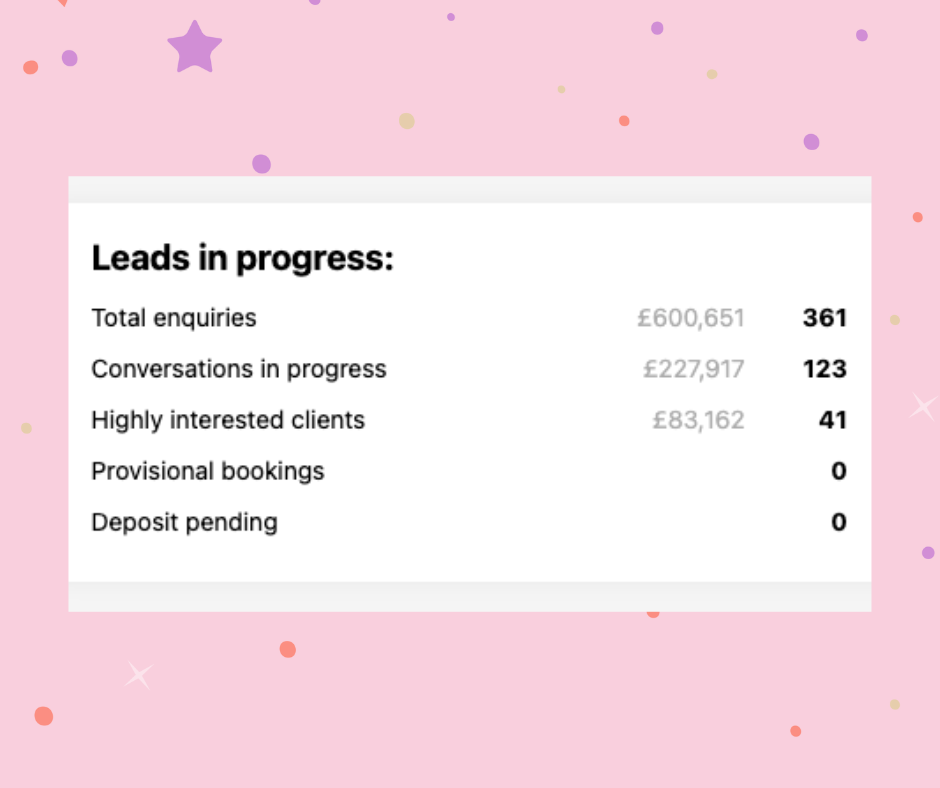
These stats give you a snapshot of how many potential bookings you have in the pipeline, in the shape of shortlists and enquiries for your Poptop services.
These stats are crucial, because it tells you exactly how much money and how many bookings you could actually generate right now. These aren’t pie-in-the-sky. These numbers represent real revenue that could end up in your pocket, if you capitlise on the opportunities.
Total Enquiries – The number of active enquiries you have right now. We represent stats as a total number of potential bookings, and the amount of revenue these bookings could generate.
Conversations in Progress – The number of active conversations you’re currently having with clients, again represented as a total number and the potential revenue they could bring you.
Highly Interested Clients – These figures represent the clients that, based on our data analysis, are ready to book, if you pursue the booking effectively.
Provisional Bookings – The number of enquiries in the provisional booking stage.
Deposit Pending – The amount of bookings awaiting deposit to fully confirm the booking.
PERFORMANCE IN THE LAST 180 DAYS
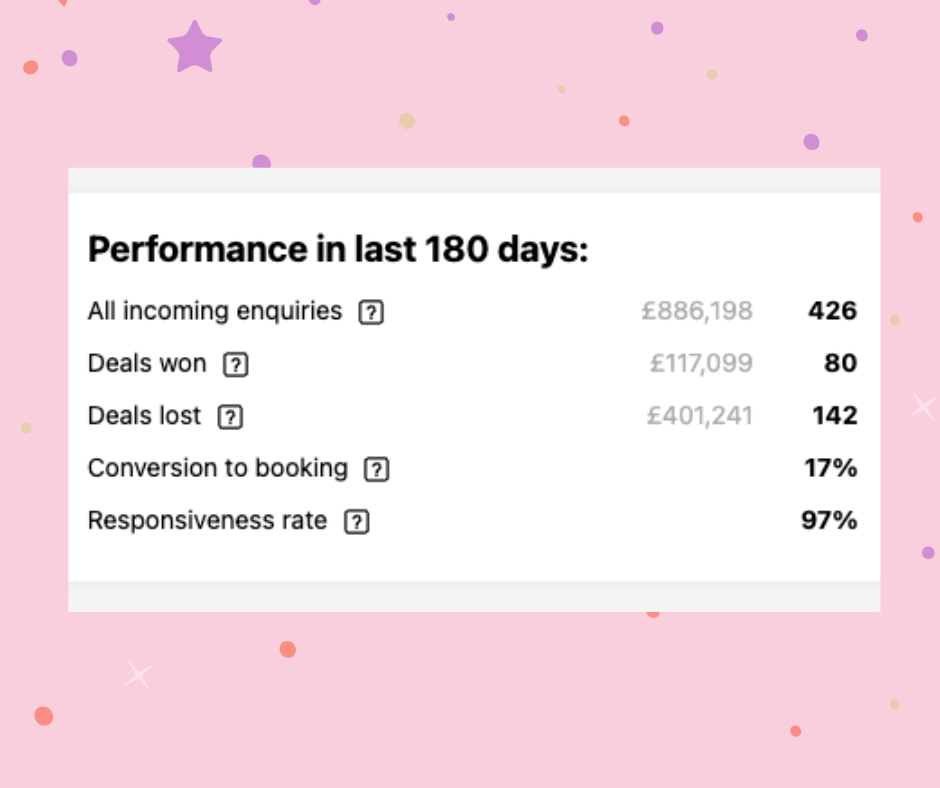
This set of stats is similar to the ‘leads in progress’ stats, but shows how your booking conversions are performing over the latest six month period.
They help you understand the bookings opportunities that were available to you, and how effectively you converted those opportunities into confirmed bookings.
All Incoming Enquiries – Similar to ‘Total Enquiries’, this stat shows you your total number of potential bookings over the last six months, and the total revenue they could have generated.
Deals Won – The bookings you confirmed 🙂
Deals Lost – The bookings you didn’t confirm 🙁
Conversion to Booking – This tells you the percentage of those incoming enquiries you turned into actual bookings. This is now a key stat for your Poptop Level – Levels 4 & 5 need a minimum 7% conversion rate, Super Suppliers need at least a 14% conversion rate.
Responsiveness Rate – Another key stat for you Poptop Level, this tells you the percentage of messages you responded to within 24hrs of receipt. Levels 4 and up need at least an 80% Responsiveness Rate.
So, what does it all mean?
We know it’s easy to feel confused or a little snowblinded by all these numbers, so here’s what it boils down to for you and your business: these stats show you your full potential on Poptop.
Your potential bookings, your potential revenue, and how much of that potential you’ve won, and how much you’ve lost. These are big, important numbers for every event business. It shows exactly where you’re at, and exactly where you could be if you converted more bookings.
So what can you do to win more bookings? Easy. Complete the Sales Assistant tasks right below these stats!
Your Sales Assistant Tasks
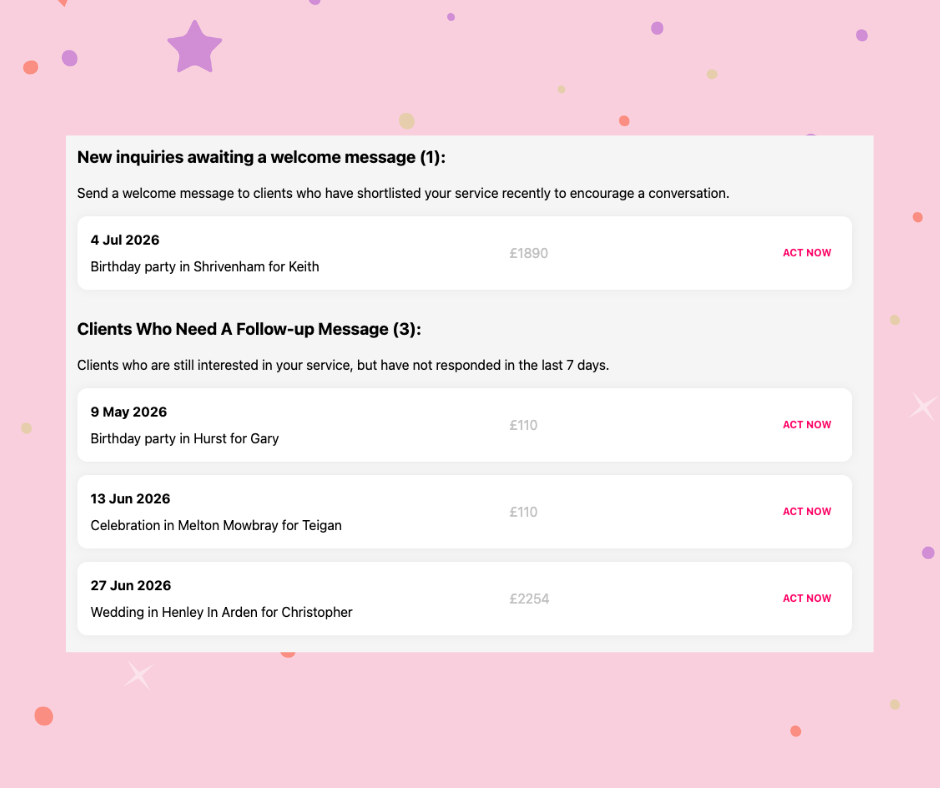
Right below your Bookings Summary you’ll find your Sales Assistant tasks. Forgive us for repeating ourselves, but it bears repeating – these aren’t just randomly assigned tasks. We know completing these tasks leads to more bookings for Poptop suppliers.
If you have no tasks to complete, that means one of two things:
You’re up to date on your Sales Assistant tasks – well done!
Or, you don’t have any active enquiries or shortlists. This could be for a number of reasons – if you’d like to know more, contact our support team for help in optimising your Poptop profile!
For now, let’s assume you have some pending tasks, take you through what they are and how to complete them. Your tasks are broken down into a few categories…
New enquiries awaiting a welcome message
Our data analysis categorically shows that suppliers that message new enquiries within a few hours of receipt convert about 50% more bookings. This is a small job but a BIG potential win. Send a quick message to say hi, and offer any assistance, by hitting ‘act now’.
New messages
These are messages from clients that require more information before progressing the booking. It might be add-ons, timing questions, or clarifying elements of your listings. These are very promising leads, so be sure to quickly and efficiently answer these to progress bookings.
Call Requests Awaiting Completion
Another very promising collection of tasks, this is a list of clients who have requested to book a call with you through the Poptop call system. Get these booked ASAP to maintain momentum.
Clients who need a followup message
These tasks cover clients that were very interested in booking you, but have been quiet for the last seven days. A quick message genuinely can be enough to reignite the booking!
Awaiting deposit payments
A list of clients who have confirmed your booking, but haven’t yet secured it with a deposit payment. Again, a quick reminder is often all it takes, but neglecting to do this can equally lead to lost bookings. Definitely worth your time!
All pretty straightforward, isn’t it? But trust us, regularly completing these simple tasks leads to more bookings. Remember that stat from earlier – suppliers that regularly use Sales Assistant get 80% more bookings.
Your Performance Insights
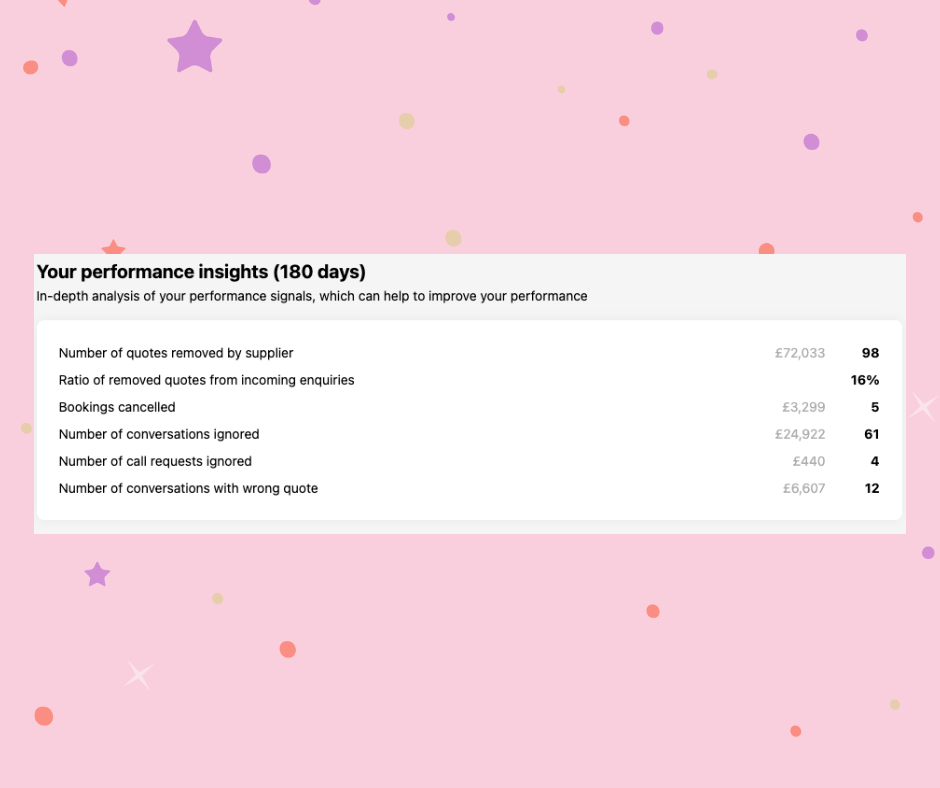
The final set of stats you see might look a bit scary, but they can be incredibly useful to you. They represent the key actions that caused you to miss out on bookings over a 180 day period.
A simple rule of thumb – you want all these numbers to be as low as possible!
Number of quotes removed by supplier – The number of quotes you voluntarily turned down, in both booking number and revenue.
Removed quotes from incoming enquiries – The number of quotes a client has removed, often due to inaction on the part of the supplier.
Bookings Cancelled – The number of confirmed bookings you cancelled (another key stat on Poptop). You want this to be as low as possible.
Number of conversations ignored – The amount of interested clients who had questions for you, but never got a response. Look at all that lost revenue!
Number of call requests ignored – As above, try to hold back the tears as you contemplate all that lost revenue…
Number of conversations with the wrong quote – Unsurprisingly, the amount of enquiries where the initial quote was incorrect!
Sales Assistant makes it simple to keep these stats low. Just complete the tasks it assigns!
In Conclusion…
Thank you for taking the time to read this piece in full – we hope you can see the power and potential of Sales Assistant. If in doubt, just log in regularly and tick off the jobs. Then watch as your booking numbers increase.
Why not start now?!